Building a macOS Detection Engineering Lab — Part 1: Introduction
MacOS detection engineering is the neglected middle child of the security world. While Windows gets all the love with tools like Sysmon, comprehensive event logging, and mature detection frameworks, macOS defenders are often left cobbling together solutions from scattered documentation and tribal knowledge.This series walks through building a proper macOS detection lab — from spinning up macOS VMs to shipping logs to Splunk for detection development. By the end, you'll have a repeatable environment for building, testing, and validating macOS detections.
Why macOS Detection Matters
Macs aren’t just for designers anymore. They’re increasingly common in:
- Engineering teams (especially at tech companies)
- Executive suites (hello, high-value targets)
- Security teams themselves (ironic, right?)
Threat actors have noticed. We’ve seen macOS-specific malware from APT groups, cryptominers targeting M1 chips, and a steady stream of macOS vulnerabilities. Yet most security teams have minimal visibility into their Mac fleet.
Time to fix that.
What We’re Building
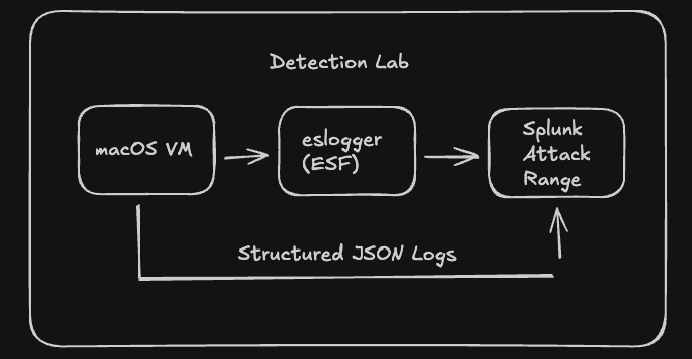
The complete lab includes:
- macOS VM — Your test target for running attacks
- Log collection — Using Apple’s Endpoint Security Framework via eslogger
- Splunk Attack Range — For log analysis and detection development
Series Overview
- Part 1 (this post): Introduction and architecture
- Part 2: Setting up macOS VMs on Mac hardware (Tart, UTM)
- Part 3: Setting up macOS VMs on Proxmox (for Intel servers)
- Part 4: Collecting macOS logs with ESF and eslogger
- Part 5: Deploying Splunk Attack Range and building detections
Prerequisites
Depending on your path:
Mac hardware path:
- Mac with Apple Silicon (M1/M2/M3/M4) or Intel
- 16GB+ RAM recommended
- Homebrew installed
Proxmox path:
- Proxmox VE server with Intel CPU (VT-x/VT-d)
- 32GB+ RAM recommended (for VM + Splunk)
- Basic familiarity with Proxmox
Both paths:
- Patience (VM builds take time)
- Willingness to troubleshoot (it’s a lab, things break)
Let’s Get Started
Ready to build a macOS detection lab that doesn’t suck?
Next up: Part 2 — macOS VMs on Mac Hardware →